
Give the chat documents to work with
Drag documents into the chat or add them with Add context to this chat. CASUS reads the parts that matter for your question and keeps the documents for the whole chat.
At a glance
- Up to 10 files per message; in Word up to 3, and up to 20 per chat.
- The chat takes PDF, DOCX, EML and MSG, up to 100 MB and 500 pages per file.
- New uploads are also kept under My Documents.
- In a Dossier chat, an attachment stays in that chat only. To make it available to all chats, upload it to the Dossier under Files.
How it works
- 1In the input field, click Add context to this chat.
- 2Choose Upload from computer, My Documents for files you uploaded before, or Templates. If Microsoft 365 is connected, you can also bring in files from SharePoint.
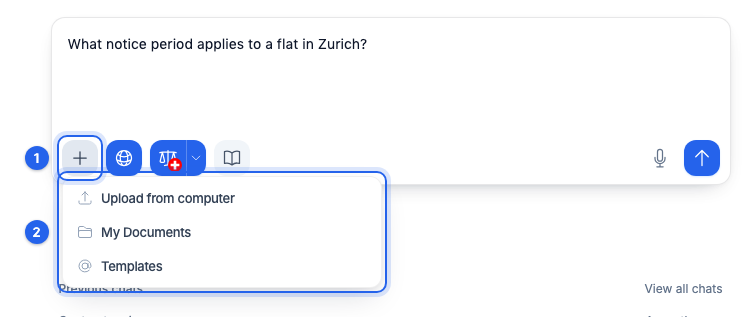
- 3Write your question. In later messages you don't need to add the document again.
If it doesn't work
If a file is refused, check format and size in the article Which files can I upload, and how many?.
This might help too
Still have questions?
Email us: contact@getcasus.com