
Ask questions about an email and its attachments
Open an email, then CASUS. CASUS takes the email and its readable attachments along automatically; you upload nothing.
At a glance
- Attachments: PDF, DOCX and attached emails. CASUS doesn't read images in the email or links to cloud files, and tells you which it had to leave out.
- Up to 10 attachments per message. CASUS takes the rest with the next message.
- Earlier chats about the same email are in the add-in's history.
- CASUS reads other emails or the whole thread only if your mailbox is connected.
How it works
- 1Open the email and click CASUS.
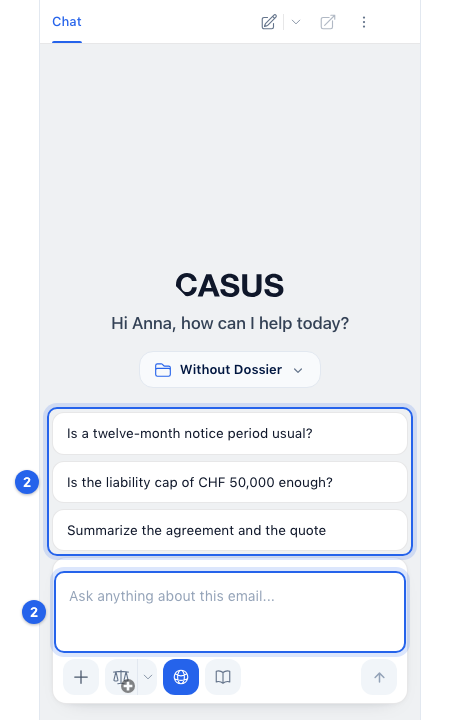
- 2Type your question into Ask anything about this email... or pick one of the suggested questions.
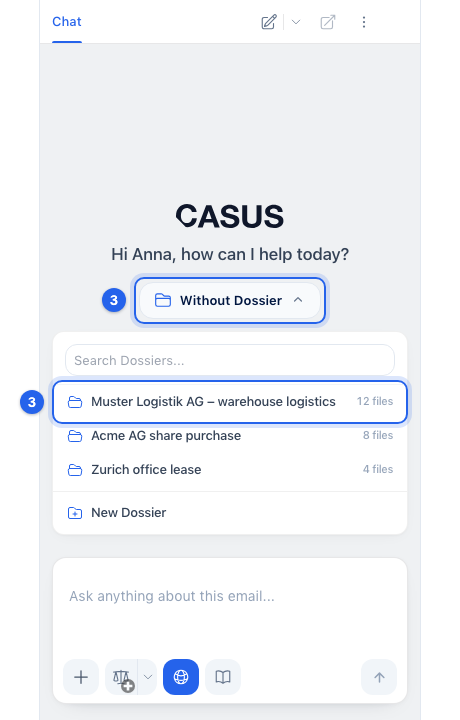
- 3If CASUS should include a Dossier, choose it in the chat.
If it doesn't work
If CASUS doesn't read the email, your Outlook version is probably too old. Update Outlook or write to us.
This might help too
Still have questions?
Email us: contact@getcasus.com