
A suggestion won't apply
Usually the passage has changed since the suggestion, or Word doesn't allow changes. The message on the card tells you which it is.
At a glance
- No longer applicable: the paragraph was changed, moved or deleted, often because changes were accepted. Ask CASUS for a new suggestion.
- Word opened the document read-only: allow editing in Word or work in a copy.
- The document is protected against editing: remove the protection in Word under Review.
- The passage is locked in Word: it sits in a locked field that CASUS may not change.
- The document allows markup only: CASUS then takes everything as a tracked change, and direct edits don't work.
How it works
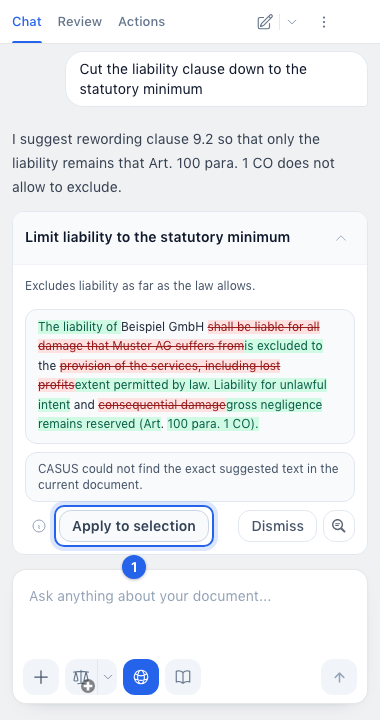
- 1If CASUS can't find the exact text, select the passage in Word and click Apply to selection.
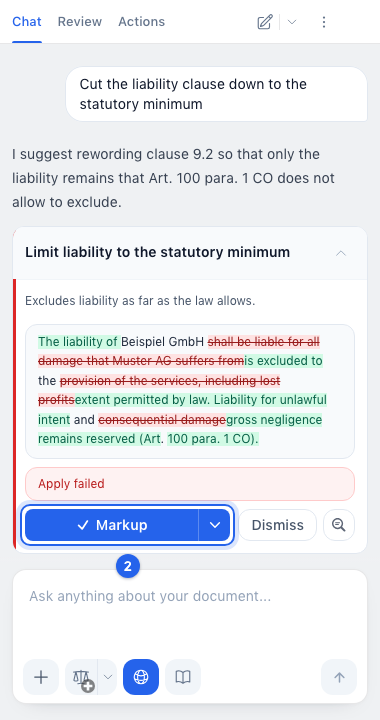
- 2If it says Apply failed, click Markup again.
If it doesn't work
If Word didn't allow the change although the document is editable, quit Word completely, open it again and write to us if it persists.
This might help too
Still have questions?
Email us: contact@getcasus.com