
The add-in disappeared from Word
Usually Word only removed the add-in from the ribbon; it is still installed. A few clicks under Add-ins bring it back. If it is missing for several people, the cause is usually the central deployment in Microsoft 365.
How it works
- 1Quit Word completely and open it again with a .docx document.
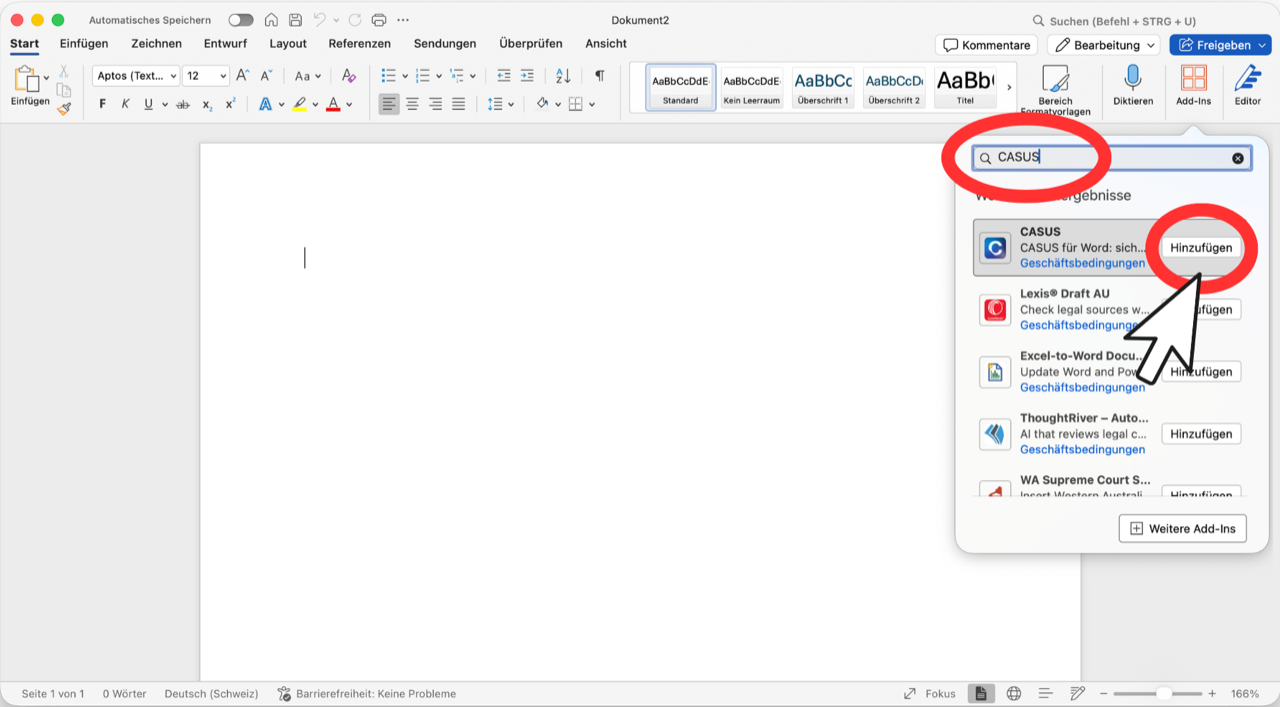
- 2On the Home tab, click Add-ins, then More Add-ins.
- 3Look for CASUS under My Add-ins. If your IT deployed it, it is under Admin Managed. The tab names differ a little between Word versions.
- 4Click CASUS, then Add. The CASUS button is back on the Home tab.
If it doesn't work
If you can't find CASUS anywhere, install it again from the Microsoft Store. If it is missing for several people, your IT should check in the Microsoft 365 admin center under Integrated apps whether CASUS is still assigned. Until then, keep working in the browser.
This might help too
Still have questions?
Email us: contact@getcasus.com