
Translate a document
CASUS translates your document in Word into 26 languages. The translation replaces the text in the same document, and formatting, numbering and tables are kept.
At a glance
- German, English and Portuguese come in two variants each: Switzerland and Germany, US and UK, Brazil and Portugal.
- Western Europe: French, Italian, Spanish and Dutch. Northern Europe: Swedish, Danish, Norwegian and Finnish.
- Central and Eastern Europe: Polish, Czech, Slovak, Slovenian, Hungarian, Romanian and Bulgarian.
- South-eastern Europe: Croatian, Serbian and Bosnian (in Latin script), Albanian and Turkish.
- The list shows each language in its own spelling, such as Français or Polski.
- The translation is not marked as a tracked change.
- Comments, footnotes, links and tables of contents are kept.
How it works
- 1Save a copy first if you want to keep the original.
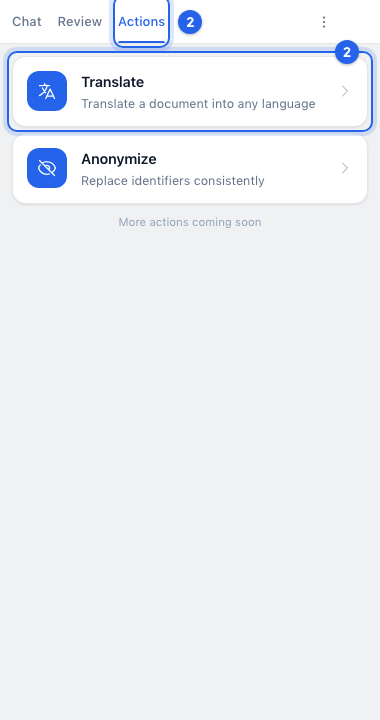
- 2Open CASUS in Word, switch to Actions and click Translate.
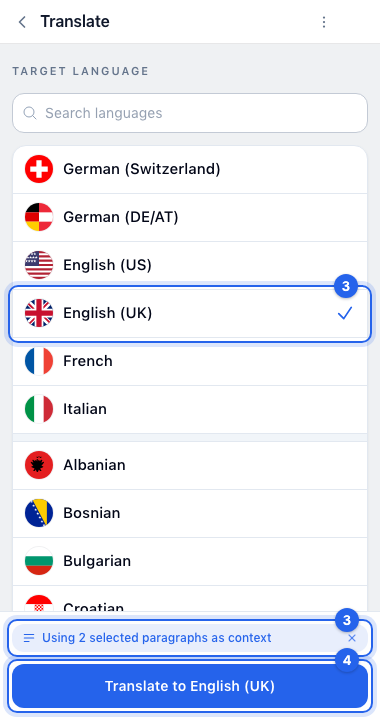
- 3Choose the Target language. If you selected text, it says, for example, “Using 2 selected paragraphs as context”, and CASUS translates only that. Click × there to translate the whole document.
- 4Click Translate to and the language.
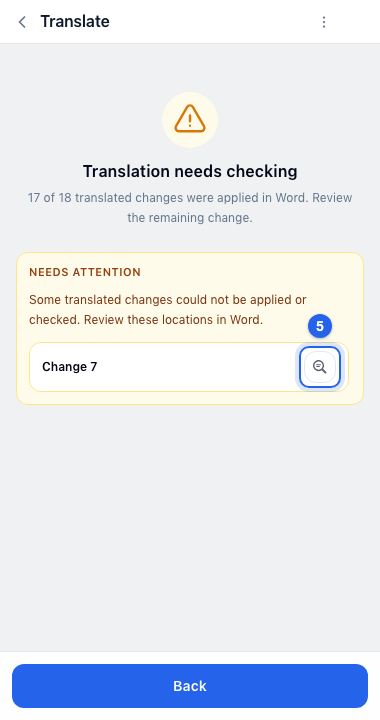
- 5If it says “Translation needs checking”, the magnifier (Locate) under Needs attention takes you to the places you should look at.
If it doesn't work
If a passage stays untranslated, it usually sits in a field CASUS can't change safely. Translate it in the chat and paste it in yourself.
This might help too
Still have questions?
Email us: contact@getcasus.com